- What does the page look like?
- 页面长什么样?
- What information should appear above the fold?
- 首屏应该放什么信息?
- How should states, actions, and hierarchy be arranged?
- 状态、操作和层级怎么安排?
In conversation-first AI products, visual blocks are the last mile. The harder task is choosing text, block, or workspace reliably under messy real input.
在对话优先的 AI 产品里,视觉 block 只是最后一公里;真正困难的是在复杂输入下稳定判断该回文字、block 还是 workspace。
- Should this question be text, a block, or a workspace?
- 这句话该回文字、block,还是 workspace?
- What is the trust boundary between model output and UI?
- 模型输出和 UI 之间的信任边界在哪里?
- Which rules belong in planner, recipe, skill, and eval?
- 哪些规则应该沉淀到 planner、recipe、skill 和 eval 里?
The core shift
最核心的转变
The goal is not free-form AI UI generation, but controlled, domain-aware interface selection. This is where UX becomes system design.
目标不是让 AI 自由生成界面,而是在业务语境里做受控、可预期的界面选择。这也是 UX 转向系统设计的分界点。
This is how I translate UX judgement into system rules.
这也是我把 UX 判断翻译成系统规则的方式。
System chain
整体链路
One business question becomes one controlled UI response.
一句业务问题,最后变成一个受控的 UI 回复。
Each step carries a distinct design responsibility: intent parsing, response-form selection, protocol constraint, and rendering. The key judgement is encoded upstream: planner routes turns, the model outputs protocol (not UI), and renderer plus density keep outcomes controllable.
这条链路把设计责任拆成四步:意图解析、回应形态选择、协议约束和渲染。关键判断被前移到上游:planner 负责路由,模型输出协议而非界面,renderer 与 density 保证结果可控。
User asks a business question
用户提出业务问题
For example: “Walk me through this week's operation first, then check East-China cost and Nova's budget tolerance.”
例如:“先过一遍这周整体经营,再看看华东成本和诺瓦预算容忍度。”
Planner classifies the turn
Planner 判断这一轮的类型
It decides whether this turn deserves plain text, a single block, or a larger workspace.
它先判断这一轮该回纯文字、单个 block,还是更大的 workspace。
ResponsePlan is produced
输出 ResponsePlan
The system chooses mode, tool, workspace update pattern, presentation recipe, and density.
系统会确定 mode、tool、workspace 更新方式、展示 recipe 与信息密度。
Tool returns structured protocol data
Tool 返回结构化协议数据
Tool schema constrains the model so it returns allowed UI data instead of arbitrary visual markup.
Tool schema 约束模型只能返回允许的 UI 数据,而不是任意控制视觉层。
Renderer maps protocol to fixed blocks
Renderer 把协议翻译成固定 block
The presentation layer applies recipe and density, but the visual surface remains under product control.
表现层会根据 recipe 和 density 调整气质,但视觉表面仍然在产品控制之内。
This is where design rules become executable: choose response form before rendering, keep trust boundaries in protocol, and control depth with explicit fields.
这里是设计规则落地为可执行系统的地方:先定回应形态,再渲染;信任边界锁在协议层;展示深度由明确字段控制。
mode
text / single-block / workspace
文字 / 单 block / workspace
Decides the response form.
决定最终的回应形态。
tool
Choose the business view
选择业务视图
Such as audit, trend, risk sandbox, vendor snapshot.
如审核、趋势、风险沙盘、供应商快照等。
workspaceMode
replace / merge
replace / merge
Controls whether this is a fresh workbench or a follow-up update.
决定是新建工作台,还是追问时局部更新。
recipeId
Presentation tone
展示气质
Like boss brief, audit form, trend monitor, sandbox.
例如老板简报、审核单、趋势监控、沙盘实验。
density
Scan or deep dive
扫一眼还是详细展开
Controls information depth without changing the protocol contract.
在不改变协议的前提下控制信息展开程度。
Technical evidence
技术证据
The work was also encoded as reusable skills, prompts, and evaluation logic.
这份设计工作,也被沉淀成了可复用的 skill、prompt 和评估逻辑。
The rules did not stay in slides; they were turned into reusable skills, checks, and eval patterns.
这些规则没有停留在文档里,而是沉淀成可复用的 skill、检查项和 eval 模式。
It specifies how to route requests and what must be locked before rendering.
明确请求如何路由,以及渲染前必须锁定的关键字段。
Response tones (executive brief, audit sheet, trend monitor, scenario lab) are defined first, then rendered consistently.
先约定回应气质(executive brief / audit sheet / trend monitor / scenario lab),再稳定落到 UI。
They test whether real requests map to the right response form, tool, and density.
验证真实请求能否匹配到正确的回应形式、工具与信息密度。
planner-playbook.mdplanner-playbook.md
presentation-recipes.mdpresentation-recipes.md
examples-positive.mdexamples-positive.md
examples-negative.mdexamples-negative.md
It is closer to a routing guide than a visual spec.
它更像一份路由规则文档,而不是传统视觉规范。
mode: text / single-block / workspace
tool: choose the business view
workspaceMode: replace or merge
recipeId: response tone
density: scan or deep dive
The same protocol can be rendered with different tones depending on task intent.
同一套协议,在不同任务意图下可以呈现成不同气质。
- executive-brief
- audit-sheet
- trend-monitor
- scenario-lab
They are written in natural business phrasing, not in system language.
它们用的是真实业务话术,而不是系统术语。
- "这周整体经营先过一遍,再看看华东成本和诺瓦预算容忍度"
- "先给我老板摘要,再展开华东成本"
- "把 4 月预算偏差最大的供应商拉出来,给我一张审核卡"
This is where trust boundary and response discipline become explicit.
这也是信任边界和回应纪律被写清楚的地方。
- "直接按你的理解做个 dashboard"
- "把所有数据都塞进一张卡里"
- "随便给我一个好看的总览卡片"
Design workflow
推荐工作流
My workflow starts with task patterns, not with components.
我的工作流会从任务模式开始,而不是先画组件。
When the design object moves upstream, the workflow changes: list tasks first, define response form, test planner, then review UI.
当设计对象前移,工作顺序也要调整:先列任务,再定回应形态,先测 planner,最后再看 UI。
- Audit
- 审核
- Trend monitoring
- 趋势监控
- Risk simulation
- 风险推演
- Record verification / boss summary
- 档案核对 / 老板摘要
- What must be visible above the fold
- 首屏重点是什么
- What fields are required
- 哪些字段必须出现
- What should never be added for fake completeness
- 哪些内容不该为了“完整”而硬补
- Feed positive / negative examples
- 补充正反例
- Run planner evaluation before visual review
- 在看 UI 前先跑 planner eval
- Only then verify recipe differences in the actual UI
- 再去确认 recipe 在视觉上是否真的有差异
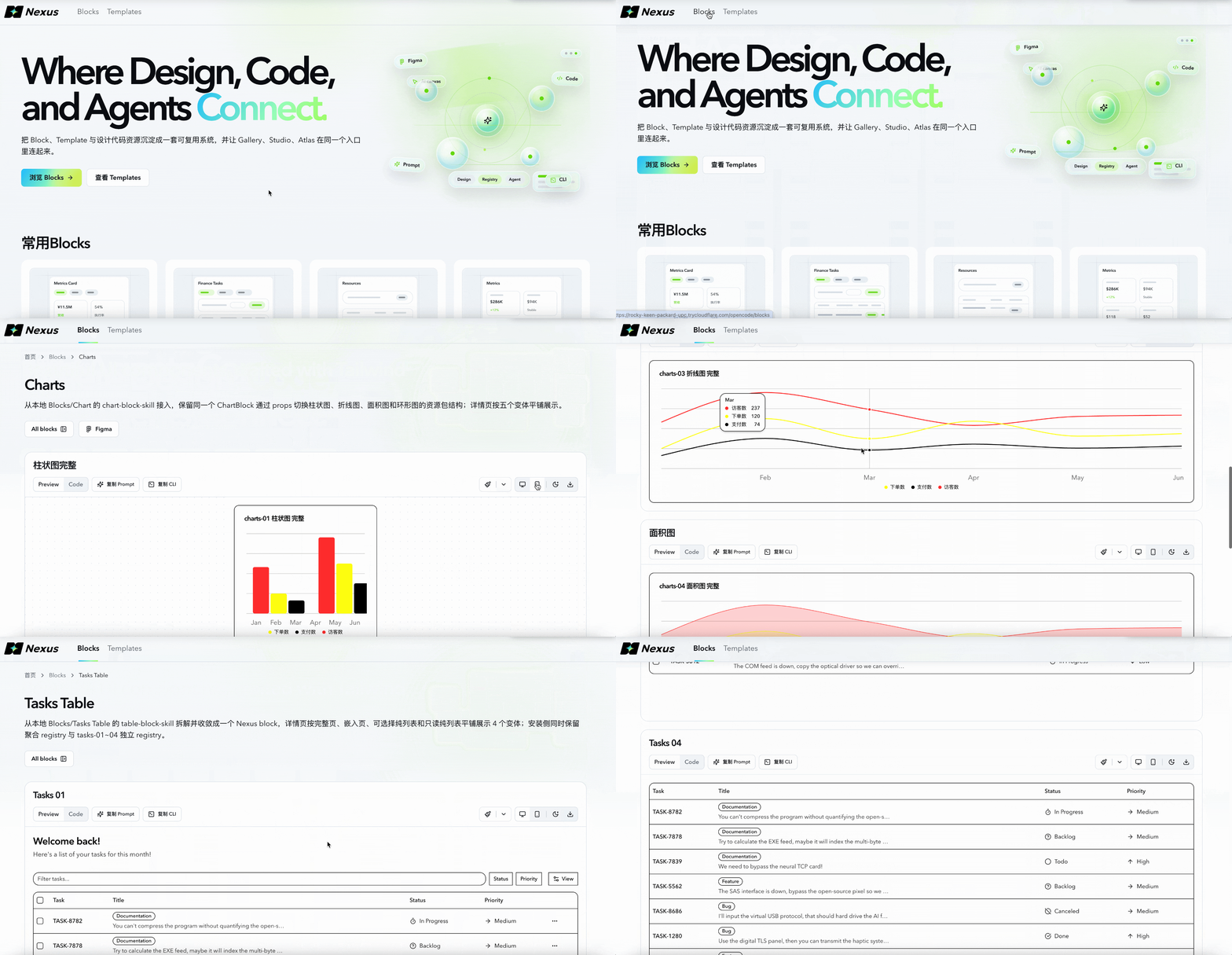
Blocks website
Blocks 官网
The official site we maintain for showcasing and organizing our blocks.
这是我们自己维护、用于展示和管理 Blocks 的官网。
It centralizes reusable blocks and templates, supports theme switching, and helps teams browse, choose, and reuse faster.
这里集中管理可复用的 Blocks 与 Templates,支持明暗主题切换,让团队更快完成浏览、选择和复用。